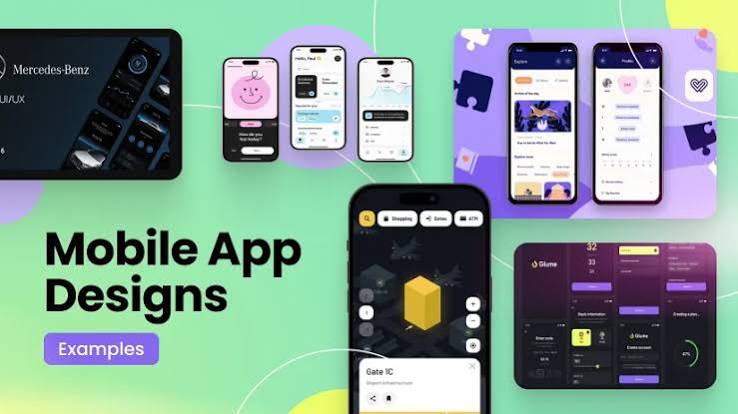
Mobile app design has evolved from a niche skill into a cornerstone of digital product success. In a world where users spend hours each day on smartphones, the difference between an app that thrives and one that is quickly deleted often comes down to thoughtful, user-centered design. Effective mobile app design balances aesthetics, functionality, performance, and accessibility while delivering seamless experiences across devices and platforms.
Understanding the Foundations of Mobile App Design
At its core, mobile app design is the process of creating interfaces and interactions tailored specifically for smartphones and tablets. Unlike desktop experiences, mobile design must account for smaller screens, touch input, variable network conditions, and frequent interruptions. Designers who master these constraints produce apps that feel natural and effortless.
Two dominant platforms shape most design decisions: iOS and Android. Apple’s Human Interface Guidelines emphasize clarity, deference, and depth, encouraging clean layouts, consistent navigation patterns, and thoughtful use of motion. Google’s Material Design system focuses on tactile surfaces, bold color, and responsive animations that communicate hierarchy and feedback. Successful designers study both systems closely and adapt principles rather than blindly copying patterns. Cross-platform tools such as Flutter and React Native further require careful consideration of platform-specific conventions so the final product feels native on each device.
Core Principles That Drive Exceptional Mobile Experiences
Several timeless principles underpin strong mobile app design. First is simplicity. Every screen should serve a clear purpose. Cluttered interfaces overwhelm users and increase cognitive load. Prioritizing content and actions through visual hierarchy—achieved with size, color, contrast, and spacing—helps users find what they need quickly.
Second is consistency. Buttons, icons, typography, and interaction patterns should behave predictably throughout the app. When users learn one gesture or button style, they should be able to apply that knowledge everywhere. Consistency also extends to branding: color palettes, illustration styles, and microcopy must align with the overall product identity.
Third is feedback. Touch interfaces lack the physical cues of traditional controls, so visual, haptic, and auditory responses become essential. Subtle animations that confirm a tap, progress indicators during loading states, and clear error messages all reassure users that the system is responding.
Fourth is accessibility. Designing for users with varying abilities is not optional. Sufficient color contrast, scalable text, support for screen readers, and alternative input methods expand an app’s reach and demonstrate genuine care for the audience. Inclusive design decisions often improve the experience for everyone.
The Role of User Research and Prototyping
Expertise in mobile app design is grounded in understanding real users. Early research—interviews, surveys, competitive analysis, and usability testing—reveals pain points and opportunities that pure aesthetics cannot address. Personas and journey maps translate research findings into concrete design direction.
Prototyping then turns ideas into testable artifacts. Low-fidelity wireframes allow rapid exploration of layout and flow. High-fidelity interactive prototypes built in tools such as Figma or Adobe XD enable realistic usability testing before development begins. Iterating based on observed behavior rather than assumptions is one of the most reliable ways to reduce costly redesigns later.
Navigation and Information Architecture
Navigation remains one of the most critical aspects of mobile app design. Tab bars work well for apps with a small number of primary destinations. Hamburger menus conserve space but can hide important features. Gesture-based navigation, popularized by iOS, offers fluidity yet requires clear discoverability cues so users do not feel lost.
Information architecture must respect the limited screen real estate. Progressive disclosure—revealing details only when needed—keeps interfaces clean. Search, filters, and smart defaults further help users locate content without endless scrolling.
Visual Design, Typography, and Motion
Visual design choices directly influence perception of quality and trustworthiness. Color should support hierarchy and brand personality while meeting accessibility standards. Typography must remain legible at small sizes; system fonts or carefully chosen web-safe alternatives often perform best. Generous white space prevents overcrowding and improves readability.
Motion design has matured from decorative flourishes into a functional language. Thoughtful transitions guide attention, indicate relationships between screens, and provide delightful moments that encourage continued engagement. Overuse of animation, however, can slow perceived performance and frustrate users, so restraint is essential.
Performance and Technical Considerations
Beautiful designs fail if the app feels sluggish. Mobile app design must account for performance from the earliest stages. Optimized images, efficient layouts, and careful handling of data loading states keep interactions responsive. Designers collaborate closely with engineers to understand technical constraints and opportunities, ensuring that visual decisions remain feasible on a range of devices, including older hardware.
Platform-specific capabilities—such as Face ID, biometric authentication, widgets, and dark mode—should be embraced when they enhance the experience. Ignoring these features can make an app feel outdated compared with competitors that leverage them thoughtfully.
Trends Shaping Modern Mobile App Design
Current trends reflect both technological advances and shifting user expectations. Dark mode has become nearly ubiquitous, reducing eye strain and conserving battery on OLED screens. Micro-interactions and subtle haptics create a sense of polish. Personalization powered by machine learning allows interfaces to adapt to individual habits without sacrificing privacy.
Voice interfaces and conversational design are expanding beyond simple assistants into more complex workflows. Augmented reality features appear in retail, education, and productivity apps, requiring new interaction paradigms. Sustainability considerations are also emerging: designers increasingly evaluate the energy impact of animations, background processes, and data usage.
Building Trust Through Transparent and Ethical Design
Trustworthiness is earned through consistent, honest design decisions. Clear privacy policies presented in plain language, transparent data practices, and easy-to-find controls for permissions all contribute to user confidence. Avoiding dark patterns—misleading interfaces that trick users into unintended actions—is both an ethical and a long-term strategic choice. Apps that respect user autonomy tend to retain customers and generate positive word-of-mouth.
Measuring Success and Continuous Improvement
Effective mobile app design is never finished. Analytics reveal which screens users abandon, which features remain undiscovered, and where friction occurs. Heatmaps, session recordings, and A/B testing provide quantitative and qualitative insights. Regular design reviews and accessibility audits keep the product aligned with evolving standards and user needs.
Collaboration across disciplines strengthens outcomes. Designers who communicate clearly with product managers, engineers, marketers, and customer support teams create more coherent experiences. Documenting design systems—shared libraries of components, patterns, and guidelines—accelerates future work and maintains consistency as teams grow.



One thought on “Mobile App Design: Principles, Best Practices & Strategies”