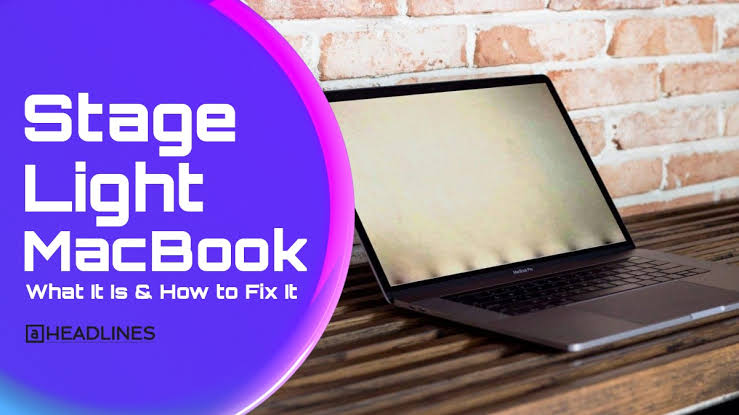
The MacBook Pro has long been praised for its sleek design. Powerful performance, and stunning Retina displays. Yet for a significant number of owners of certain models. A peculiar visual glitch known. As the stage light effect has turned an otherwise premium experience into a source of frustration. This issue, sometimes called Flexgate, manifests as uneven bright. Dark patches along the bottom edge of the screen that resemble theatrical stage lighting or footlights shining upward. Over time, it can progress to complete backlight failure when the lid is opened beyond a certain angle. Understanding this problem requires looking at its technical roots. The models most affected, available remedies, and practical steps owners can take.
What the Stage Light Effect Looks Like and Why It Matters
Users first notice the stage light effect as irregular bands of light. Shadow at the lower portion of the display. The pattern often becomes more pronounced at higher brightness settings or after the laptop has been running for a while. In early stages the problem may come and go, especially when the screen is adjusted to different angles. As the underlying damage worsens, the backlight can cut out entirely. Once the lid opens past roughly 40 degrees, rendering the display unusable for normal work.
This is more than a cosmetic annoyance. Professionals who rely on accurate color and consistent brightness for photo editing, video production. The design work find the flickering and uneven illumination disruptive. Everyday users experience eye strain and reduced productivity. Because the MacBook Pro is marketed as a durable professional tool, the appearance of such a defect. After only a few years of normal use raises legitimate questions about long-term reliability.
The Root Cause: Fragile Flex Cables and Design Trade-offs
The stage light effect stems from a hardware design choice introduced with the 2016. MacBook Pro models that featured the Touch Bar. To achieve a thinner chassis, Apple replaced the thicker. More robust wire cables used in earlier generations with ultra-thin flexible ribbon cables. These cables connect the display to a controller board located beneath the Touch Bar area. Every time the lid opens or closes, the cables flex and experience mechanical stress.
Over repeated cycles the cables fatigue. The backlight cable typically fails first, producing the characteristic stage-light pattern of alternating bright and dark zones. Independent repair specialists, notably iFixit, documented that the cables are integrated into the display assembly itself. This design decision means a simple cable replacement is impossible. The entire display must be swapped, transforming. What could have been a low-cost repair into an expensive one often exceeding several hundred dollars.
Apple later lengthened the cable by a few millimeters in 2018 models. Which reduced the strain and largely mitigated the issue in subsequent generations. Nevertheless, scattered reports continue to appear on later machines, sometimes linked to debris. Grit accumulation near the hinge, or damage to the thin chin plate that can nick the cables.
Affected Models and Apple’s Response
The problem primarily impacted 13-inch and 15-inch MacBook Pro models from 2016 through 2018. With the highest concentration in units manufactured between late 2016 and early 2018. Some 2019 and 2020 units also showed similar symptoms, though far less frequently. Apple acknowledged the backlight issue for a limited subset of 2016 13-inch models. This models launching a free Display Backlight Service Program in 2019. The program originally covered units for four years after first retail sale and was later extended. Eligible owners could obtain a free display replacement through Apple or an authorized service provider. Provided no other unrelated damage was present.
Coverage was narrower than many owners hoped. 15-inch models and later 13-inch variants were generally excluded, leaving those users to pay out of pocket. Class-action lawsuits alleging that Apple knowingly sold defective machines and failed to disclose the flaw were filed. Courts ultimately dismissed the suits, ruling that Apple had no legal obligation to reveal. The design vulnerability and that the issue did not constitute a safety hazard. The legal outcome left many owners without broader financial recourse.
Practical Steps for Diagnosis and Repair
Owners who suspect the stage light effect should first rule out software causes. Resetting the System Management Controller and NVRAM, testing the display in Safe Mode. Connecting an external monitor can help confirm whether the problem is isolated to the internal screen. If the external display works normally while the built-in screen shows the stage-light pattern, hardware failure is almost certain.
For machines still under AppleCare or within the original service program window, contacting. Apple Support or visiting an Apple Store is the logical first step. Outside those windows, independent repair shops experienced with MacBook Pro displays offer alternatives. Some technicians can diagnose cable integrity under magnification and, in rare cases. Attempt microsoldering or cable-extension workarounds, though success rates vary and full display replacement remains the most reliable fix.
Prevention is limited once the cables begin to degrade, but certain habits can slow further wear. Avoiding extreme opening angles when possible. Keeping the hinge area free of dust and debris, and handling the lid gently all help. Newer MacBook Pros with redesigned cable lengths and the transition away from the original Touch Bar. architecture have made the classic stage light effect far less common.



One thought on “MacBook Pro Stage Light Effect: Causes, Fixes & Guide”